> ## Documentation Index
> Fetch the complete documentation index at: https://developers.plane.so/llms.txt
> Use this file to discover all available pages before exploring further.
# Configure Slack App for Plane integration
This guide walks you through setting up a Slack App to enable Slack integration for your Plane workspace on a self-hosted instance. Since self-hosted environments don’t come pre-configured for Slack, you’ll need to set up the necessary authentication, permissions, and event subscriptions to ensure seamless communication between Plane and Slack.
In this guide, you’ll:
1. [Create and configure a Slack App](/self-hosting/govern/integrations/slack#create-slack-app)
2. [Configure your Plane instance](/self-hosting/govern/integrations/slack#configure-plane-instance)
**Activate Slack integration**
After creating and configuring the Slack app and configuring the instance as detailed on this page, you'll need to [set up the Slack integration](https://docs.plane.so/integrations/slack) within Plane.
## Create Slack App
To configure Slack integration, you'll need to create a Slack App within your organization. Follow these steps:
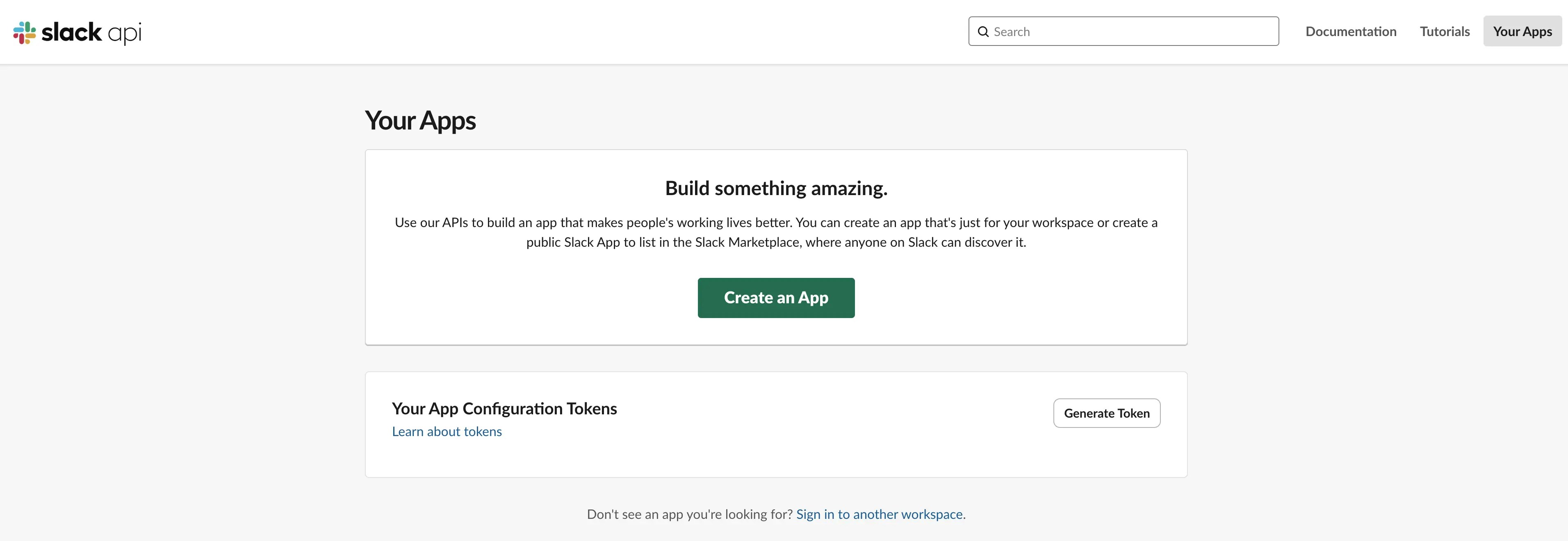
1. Go to [Your Apps](https://api.slack.com/apps) on Slack.
2. Click **Create an App**.
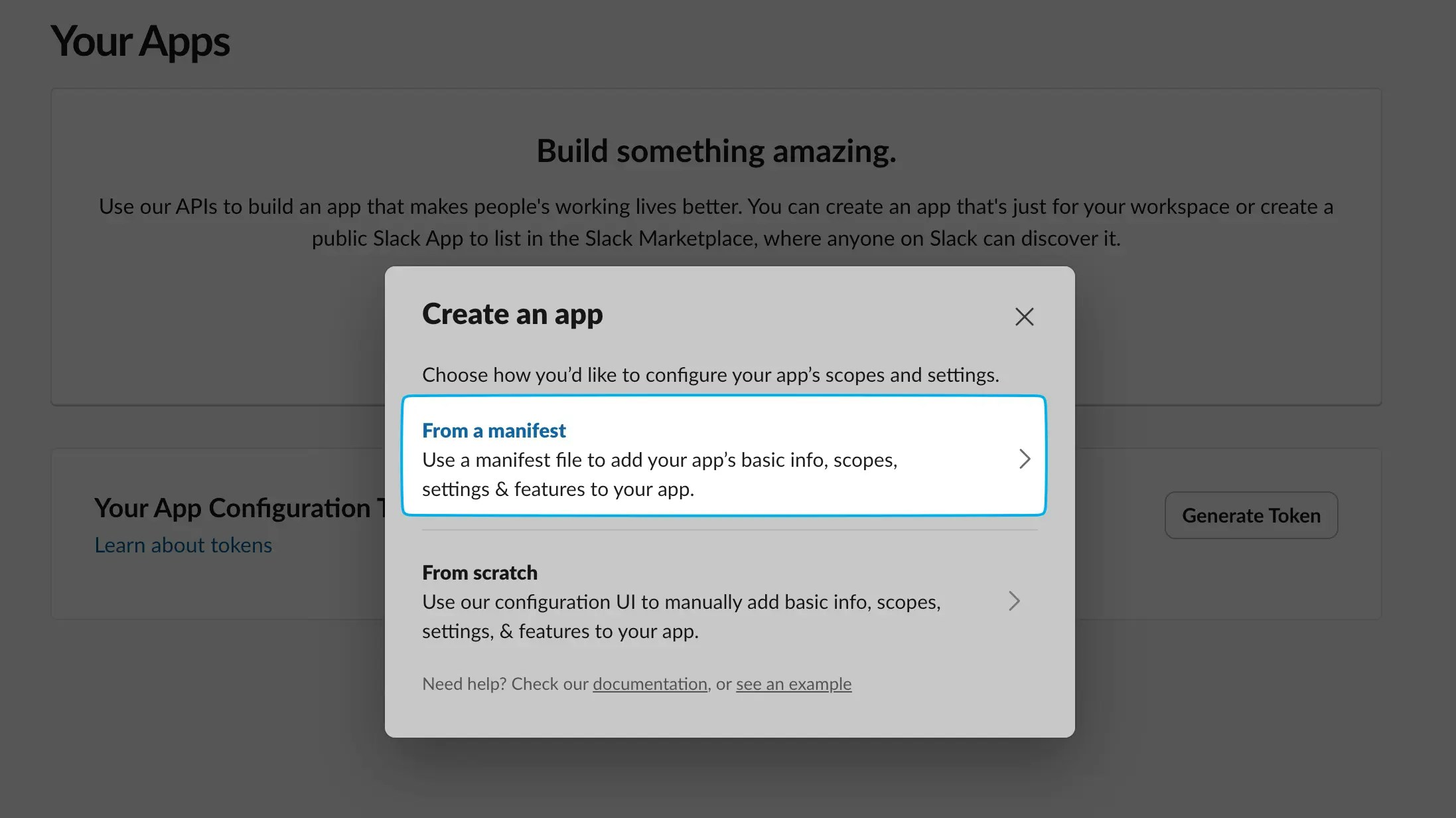
 3. Choose **From a manifest**.
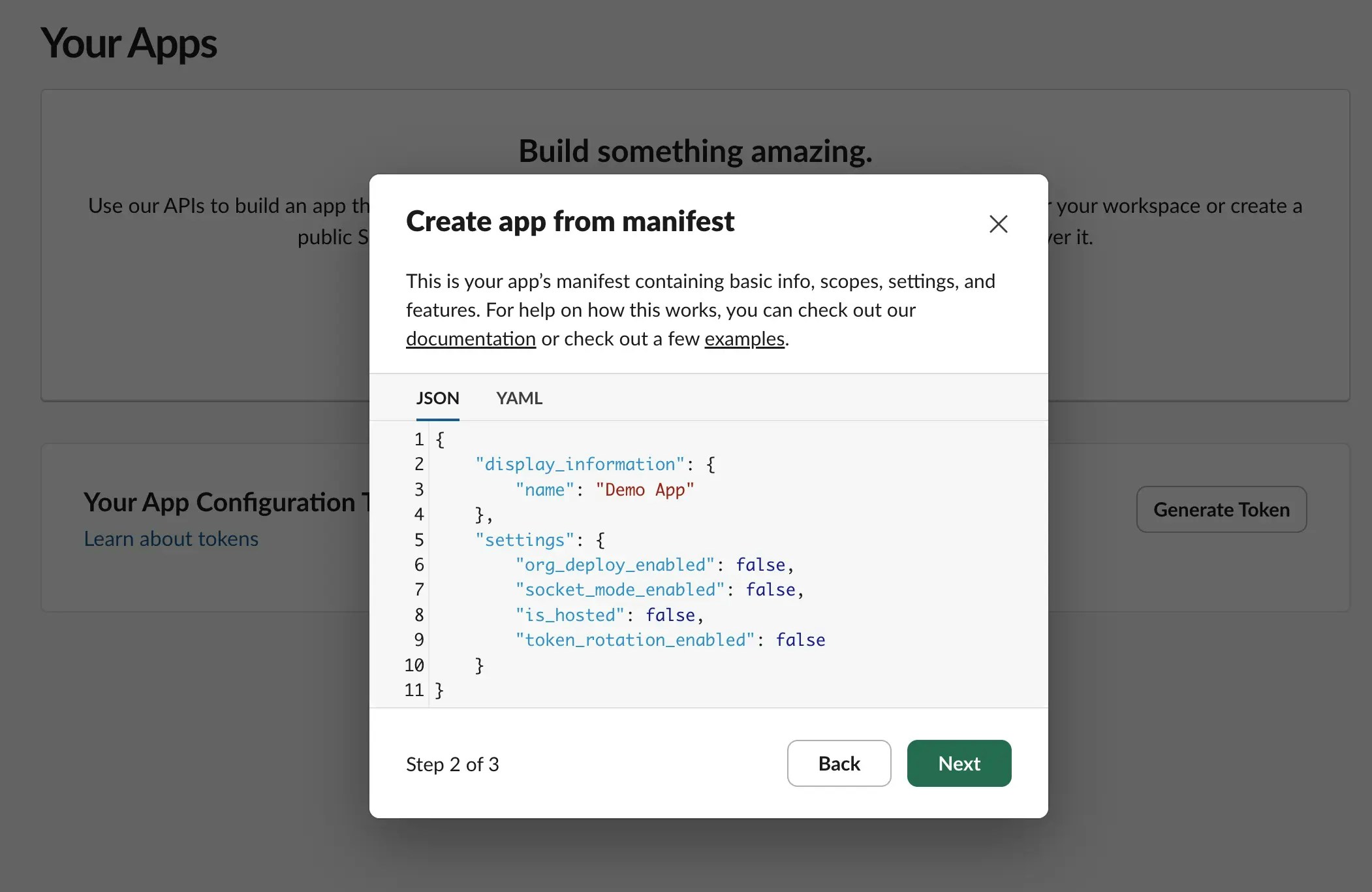
 4. Select the workspace where you want the app installed.
5. Remove the default manifest and paste the one below, making sure to update the placeholders with your actual values.
4. Select the workspace where you want the app installed.
5. Remove the default manifest and paste the one below, making sure to update the placeholders with your actual values.
 ```json theme={null}
{
"display_information": {
"name": "[YOUR_APP_NAME]",
"description": "[YOUR_APP_DESCRIPTION]",
"background_color": "#224dab"
},
"features": {
"bot_user": {
"display_name": "[YOUR_APP_NAME]",
"always_online": false
},
"shortcuts": [
{
"name": "Create new issue",
"type": "message",
"callback_id": "issue_shortcut",
"description": "Create a new issue in plane"
},
{
"name": "Link Work Item",
"type": "message",
"callback_id": "link_work_item",
"description": "Links thread with an existing work item"
}
],
"slash_commands": [
{
"command": "/plane",
"url": "https://[YOUR_DOMAIN]silo/api/slack/command/",
"description": "Create issue in Plane",
"should_escape": false
}
],
"unfurl_domains": [
"[YOUR_DOMAIN]"
]
},
"oauth_config": {
"redirect_urls": [
"https://[YOUR_DOMAIN]silo/api/slack/team/auth/callback/",
"https://[YOUR_DOMAIN]silo/api/slack/user/auth/callback/"
],
"scopes": {
"user": [
"chat:write",
"identify",
"im:read",
"im:write",
"links:write",
"links:read"
],
"bot": [
"channels:join",
"channels:read",
"users:read",
"users:read.email",
"chat:write",
"chat:write.customize",
"channels:history",
"groups:history",
"mpim:history",
"im:history",
"links:read",
"links:write",
"groups:read",
"im:read",
"mpim:read",
"reactions:read",
"reactions:write",
"files:read",
"files:write",
"im:write",
"commands"
]
}
},
"settings": {
"event_subscriptions": {
"request_url": "https://[YOUR_DOMAIN]silo/api/slack/events",
"bot_events": [
"link_shared",
"message.channels",
"message.im"
]
},
"interactivity": {
"is_enabled": true,
"request_url": "https://[YOUR_DOMAIN]silo/api/slack/action/",
"message_menu_options_url": "https://[YOUR_DOMAIN]silo/api/slack/options/"
},
"org_deploy_enabled": false,
"socket_mode_enabled": false,
"token_rotation_enabled": true
}
}
```
```yaml theme={null}
display_information:
name: [YOUR_APP_NAME]
description: [YOUR_APP_DESCRIPTION]
background_color: "#224dab"
features:
bot_user:
display_name: [YOUR_APP_NAME]
always_online: false
shortcuts:
- name: Create new issue
type: message
callback_id: issue_shortcut
description: Create a new issue in plane
- name: Link Work Item
type: message
callback_id: link_work_item
description: Links thread with an existing work item
slash_commands:
- command: /plane
url: https://[YOUR_DOMAIN]silo/api/slack/command/
description: Create issue in Plane
should_escape: false
unfurl_domains:
- [YOUR_DOMAIN]
oauth_config:
redirect_urls:
- https://[YOUR_DOMAIN]silo/api/slack/team/auth/callback/
- https://[YOUR_DOMAIN]silo/api/slack/user/auth/callback/
scopes:
user:
- chat:write
- identify
- im:read
- im:write
- links:write
- links:read
bot:
- channels:join
- channels:read
- users:read
- users:read.email
- chat:write
- chat:write.customize
- channels:history
- groups:history
- mpim:history
- im:history
- links:read
- links:write
- groups:read
- im:read
- mpim:read
- reactions:read
- reactions:write
- files:read
- files:write
- im:write
- commands
settings:
event_subscriptions:
request_url: https://[YOUR_DOMAIN]silo/api/slack/events
bot_events:
- link_shared
- message.channels
- message.im
interactivity:
is_enabled: true
request_url: https://[YOUR_DOMAIN]silo/api/slack/action/
message_menu_options_url: https://[YOUR_DOMAIN]silo/api/slack/options/
org_deploy_enabled: false
socket_mode_enabled: false
token_rotation_enabled: true
```
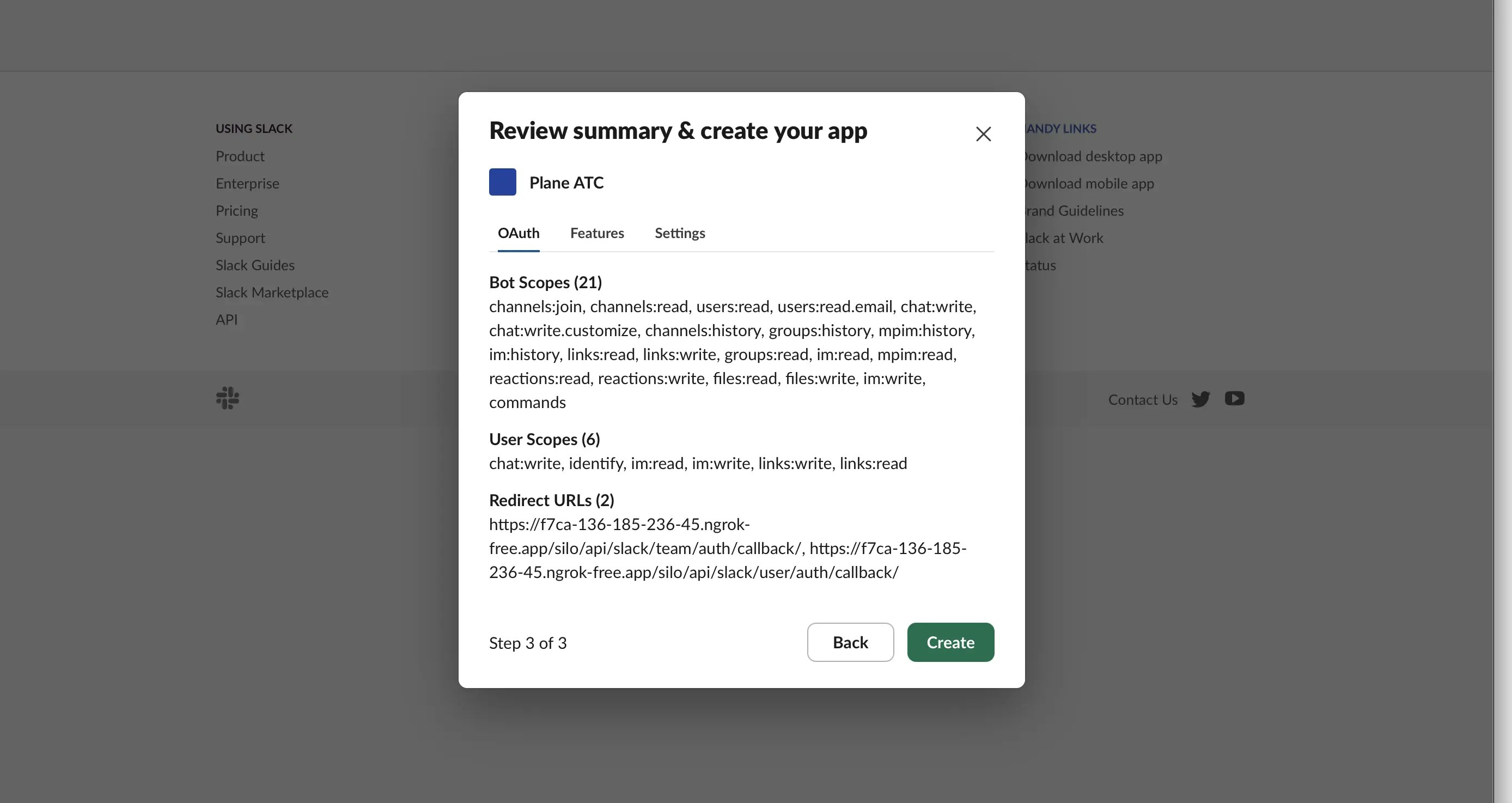
6. Review the permissions and click **Create**.
```json theme={null}
{
"display_information": {
"name": "[YOUR_APP_NAME]",
"description": "[YOUR_APP_DESCRIPTION]",
"background_color": "#224dab"
},
"features": {
"bot_user": {
"display_name": "[YOUR_APP_NAME]",
"always_online": false
},
"shortcuts": [
{
"name": "Create new issue",
"type": "message",
"callback_id": "issue_shortcut",
"description": "Create a new issue in plane"
},
{
"name": "Link Work Item",
"type": "message",
"callback_id": "link_work_item",
"description": "Links thread with an existing work item"
}
],
"slash_commands": [
{
"command": "/plane",
"url": "https://[YOUR_DOMAIN]silo/api/slack/command/",
"description": "Create issue in Plane",
"should_escape": false
}
],
"unfurl_domains": [
"[YOUR_DOMAIN]"
]
},
"oauth_config": {
"redirect_urls": [
"https://[YOUR_DOMAIN]silo/api/slack/team/auth/callback/",
"https://[YOUR_DOMAIN]silo/api/slack/user/auth/callback/"
],
"scopes": {
"user": [
"chat:write",
"identify",
"im:read",
"im:write",
"links:write",
"links:read"
],
"bot": [
"channels:join",
"channels:read",
"users:read",
"users:read.email",
"chat:write",
"chat:write.customize",
"channels:history",
"groups:history",
"mpim:history",
"im:history",
"links:read",
"links:write",
"groups:read",
"im:read",
"mpim:read",
"reactions:read",
"reactions:write",
"files:read",
"files:write",
"im:write",
"commands"
]
}
},
"settings": {
"event_subscriptions": {
"request_url": "https://[YOUR_DOMAIN]silo/api/slack/events",
"bot_events": [
"link_shared",
"message.channels",
"message.im"
]
},
"interactivity": {
"is_enabled": true,
"request_url": "https://[YOUR_DOMAIN]silo/api/slack/action/",
"message_menu_options_url": "https://[YOUR_DOMAIN]silo/api/slack/options/"
},
"org_deploy_enabled": false,
"socket_mode_enabled": false,
"token_rotation_enabled": true
}
}
```
```yaml theme={null}
display_information:
name: [YOUR_APP_NAME]
description: [YOUR_APP_DESCRIPTION]
background_color: "#224dab"
features:
bot_user:
display_name: [YOUR_APP_NAME]
always_online: false
shortcuts:
- name: Create new issue
type: message
callback_id: issue_shortcut
description: Create a new issue in plane
- name: Link Work Item
type: message
callback_id: link_work_item
description: Links thread with an existing work item
slash_commands:
- command: /plane
url: https://[YOUR_DOMAIN]silo/api/slack/command/
description: Create issue in Plane
should_escape: false
unfurl_domains:
- [YOUR_DOMAIN]
oauth_config:
redirect_urls:
- https://[YOUR_DOMAIN]silo/api/slack/team/auth/callback/
- https://[YOUR_DOMAIN]silo/api/slack/user/auth/callback/
scopes:
user:
- chat:write
- identify
- im:read
- im:write
- links:write
- links:read
bot:
- channels:join
- channels:read
- users:read
- users:read.email
- chat:write
- chat:write.customize
- channels:history
- groups:history
- mpim:history
- im:history
- links:read
- links:write
- groups:read
- im:read
- mpim:read
- reactions:read
- reactions:write
- files:read
- files:write
- im:write
- commands
settings:
event_subscriptions:
request_url: https://[YOUR_DOMAIN]silo/api/slack/events
bot_events:
- link_shared
- message.channels
- message.im
interactivity:
is_enabled: true
request_url: https://[YOUR_DOMAIN]silo/api/slack/action/
message_menu_options_url: https://[YOUR_DOMAIN]silo/api/slack/options/
org_deploy_enabled: false
socket_mode_enabled: false
token_rotation_enabled: true
```
6. Review the permissions and click **Create**.
 ### Manifest reference
The manifest file defines the configuration for integrating Plane with Slack. It requests access to several features, enabling Plane to interact with Slack efficiently.
#### Features
| Feature | Explanation |
| ---------------- | ------------------------------------------------------------------------------------------------------------------------------------------ |
| `bot_user` | Required to send thread messages while syncing issues or sending Plane notifications to Slack. |
| `slack_commands` | A Slack command (`/plane`) allows users to create issues directly from Slack using a slash command. |
| `shortcuts` | After activation, users can create issues from messages inside Slack. |
| `unfurl_domain` | Specifies the domain where Plane is hosted. When an issue, cycle, or module link is pasted in Slack, it generates a preview of the entity. |
#### Variables
| Variable | Explanation |
| ---------------------- | ----------------------------------------------------------------------------------------------------------- |
| `YOUR_DOMAIN` | The domain where Plane is hosted. This is required for sending webhook events and authentication callbacks. |
| `YOUR_APP_NAME` | The name you want to give your Slack app. "Plane" is a good default option. |
| `YOUR_APP_DESCRIPTION` | A short description of your Slack app’s purpose. |
#### Event subscription
For thread sync and link unfurling to work, event subscriptions must be enabled. These events send relevant activity to Plane.
| Bot event | Explanation |
| ------------------ | ---------------------------------------------------------------------------------------------------------------------------------------- |
| `link_shared` | When a link is shared in Slack and its hostname matches `unfurl_domain`, Plane receives the event and generates a preview of the entity. |
| `message_channels` | When a message is posted in a channel, an event is triggered in Plane to support thread sync. |
| `message_im` | When a direct message (DM) is posted, an event is triggered in Plane to support thread sync. |
#### User permissions
| Permission | Explanation |
| ------------- | -------------------------------------------------------------------------------- |
| `chat:write` | Allows the bot to send messages in channels and conversations it is a member of. |
| `identify` | Allows the bot to verify its own identity and retrieve basic information. |
| `im:read` | Enables the bot to view direct messages (DMs) where it has been added. |
| `im:write` | Allows the bot to send direct messages (DMs) to users. |
| `links:write` | Permits the bot to add, edit, and remove link unfurls. |
| `links:read` | Allows the bot to view link unfurls and associated metadata. |
#### Bot permissions
| Permission | Explanation |
| ---------------------- | -------------------------------------------------------------------------- |
| `channels:join` | Allows the bot to join public channels. |
| `channels:read` | Permits viewing public channel information and members. |
| `users:read` | Allows viewing user information and presence status. |
| `users:read.email` | Enables access to users' email addresses. |
| `chat:write` | Allows sending messages in channels and conversations. |
| `chat:write.customize` | Enables customization of the bot's name and profile when sending messages. |
| `channels:history` | Allows viewing message history in public channels. |
| `groups:history` | Permits viewing message history in private channels. |
| `mpim:history` | Enables access to message history in multi-person direct messages. |
| `im:history` | Allows viewing message history in direct messages. |
| `links:read` | Permits viewing link unfurls and associated metadata. |
| `links:write` | Allows adding, editing, and removing link unfurls. |
| `groups:read` | Enables viewing private channel information and members. |
| `im:read` | Allows viewing direct messages where the bot is added. |
| `mpim:read` | Permits viewing multi-person direct messages. |
| `reactions:read` | Enables viewing emoji reactions on messages. |
| `reactions:write` | Allows adding and removing emoji reactions. |
| `files:read` | Permits viewing and downloading files. |
| `files:write` | Enables uploading, editing, and deleting files. |
| `im:write` | Allows sending direct messages to users. |
| `commands` | Enables the bot to add and respond to slash commands. |
## Configure Plane instance
After creating your Slack app, follow these steps:
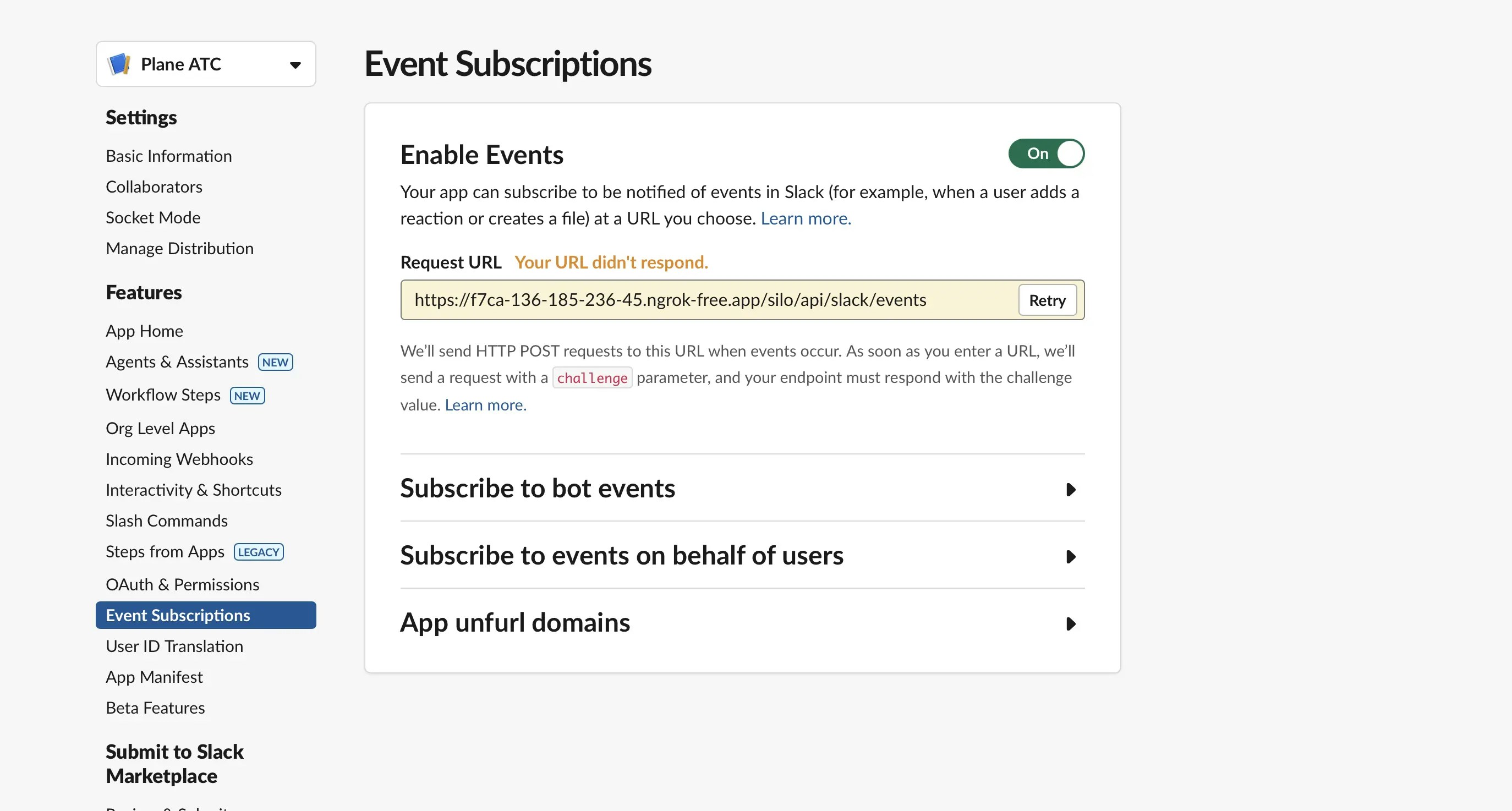
1. Go to the **Event Subscriptions** tab.
2. Click **Retry** to verify your event subscription URL.
### Manifest reference
The manifest file defines the configuration for integrating Plane with Slack. It requests access to several features, enabling Plane to interact with Slack efficiently.
#### Features
| Feature | Explanation |
| ---------------- | ------------------------------------------------------------------------------------------------------------------------------------------ |
| `bot_user` | Required to send thread messages while syncing issues or sending Plane notifications to Slack. |
| `slack_commands` | A Slack command (`/plane`) allows users to create issues directly from Slack using a slash command. |
| `shortcuts` | After activation, users can create issues from messages inside Slack. |
| `unfurl_domain` | Specifies the domain where Plane is hosted. When an issue, cycle, or module link is pasted in Slack, it generates a preview of the entity. |
#### Variables
| Variable | Explanation |
| ---------------------- | ----------------------------------------------------------------------------------------------------------- |
| `YOUR_DOMAIN` | The domain where Plane is hosted. This is required for sending webhook events and authentication callbacks. |
| `YOUR_APP_NAME` | The name you want to give your Slack app. "Plane" is a good default option. |
| `YOUR_APP_DESCRIPTION` | A short description of your Slack app’s purpose. |
#### Event subscription
For thread sync and link unfurling to work, event subscriptions must be enabled. These events send relevant activity to Plane.
| Bot event | Explanation |
| ------------------ | ---------------------------------------------------------------------------------------------------------------------------------------- |
| `link_shared` | When a link is shared in Slack and its hostname matches `unfurl_domain`, Plane receives the event and generates a preview of the entity. |
| `message_channels` | When a message is posted in a channel, an event is triggered in Plane to support thread sync. |
| `message_im` | When a direct message (DM) is posted, an event is triggered in Plane to support thread sync. |
#### User permissions
| Permission | Explanation |
| ------------- | -------------------------------------------------------------------------------- |
| `chat:write` | Allows the bot to send messages in channels and conversations it is a member of. |
| `identify` | Allows the bot to verify its own identity and retrieve basic information. |
| `im:read` | Enables the bot to view direct messages (DMs) where it has been added. |
| `im:write` | Allows the bot to send direct messages (DMs) to users. |
| `links:write` | Permits the bot to add, edit, and remove link unfurls. |
| `links:read` | Allows the bot to view link unfurls and associated metadata. |
#### Bot permissions
| Permission | Explanation |
| ---------------------- | -------------------------------------------------------------------------- |
| `channels:join` | Allows the bot to join public channels. |
| `channels:read` | Permits viewing public channel information and members. |
| `users:read` | Allows viewing user information and presence status. |
| `users:read.email` | Enables access to users' email addresses. |
| `chat:write` | Allows sending messages in channels and conversations. |
| `chat:write.customize` | Enables customization of the bot's name and profile when sending messages. |
| `channels:history` | Allows viewing message history in public channels. |
| `groups:history` | Permits viewing message history in private channels. |
| `mpim:history` | Enables access to message history in multi-person direct messages. |
| `im:history` | Allows viewing message history in direct messages. |
| `links:read` | Permits viewing link unfurls and associated metadata. |
| `links:write` | Allows adding, editing, and removing link unfurls. |
| `groups:read` | Enables viewing private channel information and members. |
| `im:read` | Allows viewing direct messages where the bot is added. |
| `mpim:read` | Permits viewing multi-person direct messages. |
| `reactions:read` | Enables viewing emoji reactions on messages. |
| `reactions:write` | Allows adding and removing emoji reactions. |
| `files:read` | Permits viewing and downloading files. |
| `files:write` | Enables uploading, editing, and deleting files. |
| `im:write` | Allows sending direct messages to users. |
| `commands` | Enables the bot to add and respond to slash commands. |
## Configure Plane instance
After creating your Slack app, follow these steps:
1. Go to the **Event Subscriptions** tab.
2. Click **Retry** to verify your event subscription URL.
 3. Navigate to the **Basic Information** tab on Slack to find your `client_id` and `client_secret`.
4. Add these environment variables with the values to your Plane instance's `.env` file.
```bash theme={null}
SLACK_CLIENT_ID=
SLACK_CLIENT_SECRET=
```
5. Save the file and restart the instance.
6. Once you've completed the instance configuration, [activate the Slack integration in Plane](https://docs.plane.so/integrations/slack).
3. Navigate to the **Basic Information** tab on Slack to find your `client_id` and `client_secret`.
4. Add these environment variables with the values to your Plane instance's `.env` file.
```bash theme={null}
SLACK_CLIENT_ID=
SLACK_CLIENT_SECRET=
```
5. Save the file and restart the instance.
6. Once you've completed the instance configuration, [activate the Slack integration in Plane](https://docs.plane.so/integrations/slack).