> ## Documentation Index
> Fetch the complete documentation index at: https://developers.plane.so/llms.txt
> Use this file to discover all available pages before exploring further.
# Plane API Documentation
> The Plane API is organized around REST. Our API has predictable resource-oriented URLs, accepts application/json request bodies, returns JSON responses, and uses standard HTTP response codes, authentication, and verbs.
**Deprecation notice**
We are deprecating all `/api/v1/.../issues/` endpoints in favor of `/api/v1/.../work-items/`.
**End of support**\
31st March 2026
**What you need to do**\
To ensure uninterrupted service, replace all `/issues/` references with `/work-items/` in your codebase before the support end date.
### Base URL
All requests to the Plane Cloud API must be made to the following base URL:
```
https://api.plane.so/
```
This URL should be prefixed to all endpoint paths.
For example, to retrieve all projects in a workspace:
```
GET https://api.plane.so/api/v1/workspaces/{workspace_slug}/projects/
```
💡 If you're using a self-hosted instance of Plane, your API base URL will differ based on your custom domain and setup.
### Authentication
Our APIs use a key for authentication. The API key should be included in the header of each request to verify the client's identity and permissions. The key should be passed as the value of the `X-API-Key` header.
You must have a Plane account or be registered to your instance to generate a key.
1. Log into your Plane account and go to **Profile Settings**.
 2. Go to **Personal Access Tokens** in the list of tabs available.
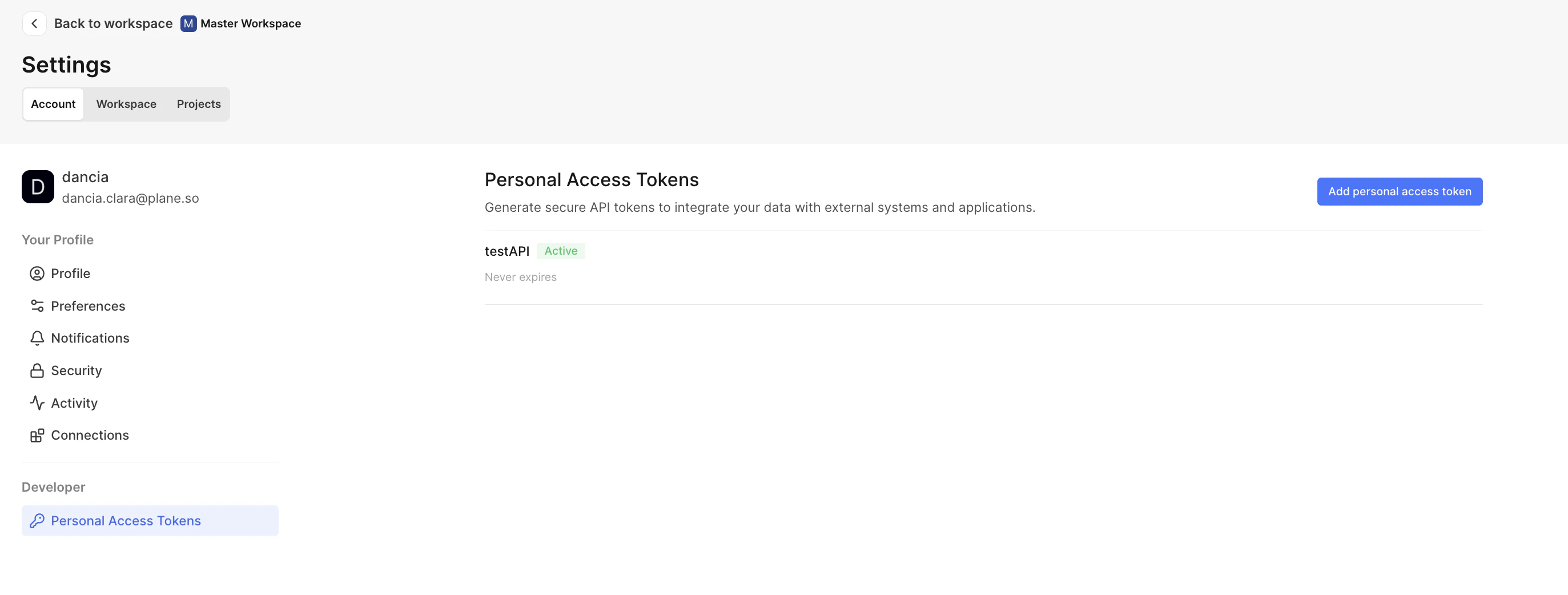 3. Click `Add personal access token`.
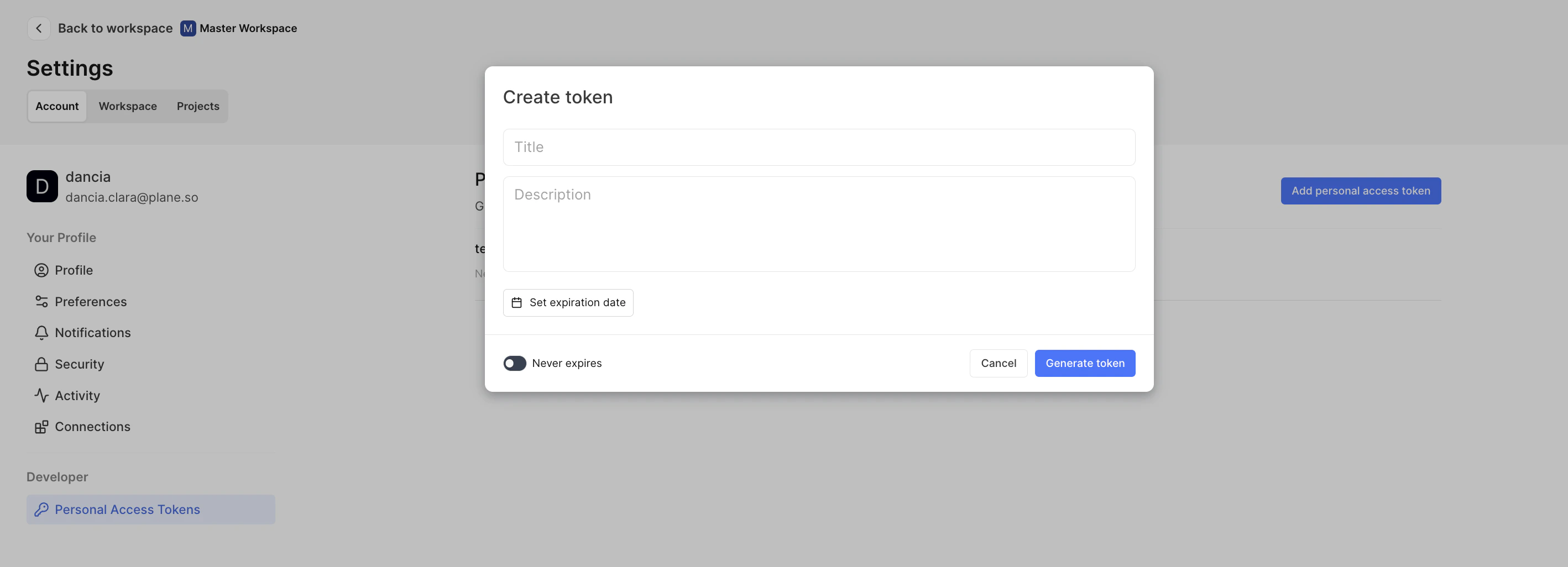 4. Choose a title and description so you know why you are creating this token and where you will use is.
5. Choose an expiry if you want this to stop working after a point.
### Using the API Key
To authenticate an API request, include your API key in the request header:
```
X-API-Key:
```
It is important to keep your API key confidential to prevent unauthorized access to your account.
### Example of an Authenticated API Request
Here's an example of making a GET request to the API with the API key:
### Request
```
GET /api/v1/workspaces/{workspace_slug}/projects/{project_id}/work-items/
Headers:
X-API-Key: plane_api_
```
### Response
```
{
[ ... ],
}
```
### Error Handling
* **Missing API Key**: If the **`X-API-Key`** header is not included, the API will return an error indicating that authentication is required.
* **Invalid API Key**: If the provided API key is invalid or expired, the API will return an error message indicating an authentication failure.
### Security Recommendations
* **Keep the API Key Secret**: Treat your API key like a password. Do not share it or expose it in client-side code.
* **Regenerate Key If Compromised**: If you suspect that your API key has been compromised, generate a new one immediately and update your applications.
***
### **Status codes**
**HTTP Methods**
HTTP defines a set of request methods, also known as HTTP verbs, to indicate the desired action for a given resource.
Given below is the list of methods commonly adopted by Plane's APIs:
| Verb | Description | Example |
| ------ | --------------------------------------------------- | ------------------------------- |
| GET | Requests a representation of the specified resource | Fetch all issues from a project |
| POST | Submits an entity to the specified resource | Create a project |
| DELETE | Deletes the specified resource | Delete a module-issue |
| PATCH | Applies partial modifications to a resource | Edit a module |
Given below is the list of the most commonly encountered success responses:
| Status Code | Description |
| -------------- | --------------------------------------------------------------------------------------------------- |
| 200 OK | The request succeeded, and a new resource was created, generally sent in GET or PATCH requests. |
| 201 Created | The request is succeeded, and a new resource was created, generally sent in POST or PATCH requests. |
| 204 No Content | The request is succeeded, and no body is sent, generally comes from the DELETE request. |
### Error Response
Given below is the list of the most commonly encountered error responses:
| Status Code | Description |
| ------------------------- | ------------------------------------------------------------------------------------------------------------------------------------------------------------------------------------- |
| 400 Bad Request | The server cannot or will not process the request due to something that is perceived to be a client error. |
| 401 Unauthorized | Although the HTTP standard specifies "unauthorized", semantically, this response means "unauthenticated". That is, the client must authenticate itself to get the requested response. |
| 404 Not Found | The server cannot find the requested resource. This means the URL is not recognized. |
| 429 Throttling Error | The server is processing too many requests at once and is unable to process your request. Retry the request after some time. You can read our rate-limit doc. |
| 500 Internal Server Error | The server has encountered a situation it does not know how to handle. |
| 502 Bad Gateway | This error response means that the server got an invalid response while working as a gateway to get a response needed to handle the request. |
| 503 Service Unavailable | The server is not ready to handle the request. Common causes are a server that is down for maintenance or is overloaded. |
| 504 Gateway Timeout | This error response is given when the server acts as a gateway and cannot get a timely response. |
## Pagination Documentation
### Overview
This API implements a cursor-based pagination system, allowing clients to efficiently navigate through large datasets. The system uses a cursor parameter to manage the position and direction of pagination.
### Cursor Format
The cursor is a string formatted as **`value:offset:is_prev`**, where:
* **`value`** represents the page size (number of items per page).
* **`offset`** is the current page number (starting from 0).
* **`is_prev`** indicates whether the cursor is moving to the previous page (**`1`**) or to the next page (**`0`**).
### Request Parameters
* **`per_page` (optional)**: Number of items to display per page. Defaults to 100. The maximum allowed value specified by the server is 100.
* **`cursor` (optional)**: Cursor string to navigate to a specific page. If not provided, pagination starts from the first page.
### Responses
The paginated response includes the following fields:
* **`next_cursor`**: Cursor string for the next page.
* **`prev_cursor`**: Cursor string for the previous page.
* **`next_page_results`**: Boolean indicating if there are more results after the current page.
* **`prev_page_results`**: Boolean indicating if there are results before the current page.
* **`count`**: Total number of items on the current page.
* **`total_pages`**: Estimated total number of pages.
* **`total_results`**: Total number of items across all pages.
* **`extra_stats`**: Additional statistics, if any.
* **`results`**: Array of items for the current page.
### Request: Fetching the First Page
```
GET /api/v1/workspaces/{workspace_slug}/projects/{project_id}/work-items/?per_page=20
```
### Response: First Page
```
{
"next_cursor": "20:1:0",
"prev_cursor": "",
"next_page_results": true,
"prev_page_results": false,
"count": 20,
"total_pages": 50,
"total_results": 1000,
"extra_stats": {},
"results": [ ... items ... ]
}
```
### Request: Fetching the Next Page
```
GET /api/v1/workspaces/{workspace_slug}/projects/{project_id}/work-items?per_page=20&cursor=20:1:0
```
### Response: Second Page
```
{
"next_cursor": "20:2:0",
"prev_cursor": "20:0:1",
"next_page_results": true,
"prev_page_results": true,
"count": 20,
"total_pages": 50,
"total_results": 1000,
"extra_stats": {},
"results": [ ... items ... ]
}
```
### Error Handling
* **Invalid Cursor Format**: If the provided cursor string is not in the correct format, the API will respond with an error message indicating an invalid cursor format.
* **Pagination Limits**: Requests exceeding the maximum **`per_page`** limit will receive an error response detailing the maximum allowed value.
***
## Rate Limit
### Overview
To ensure fair usage and maintain the quality of service for all users, our API implements rate limiting. Rate limiting restricts the number of requests a client can make within a certain time frame.
### Rate Limit Details
* **Limit**: Each client is limited to 60 requests per minute.
* **Reset Interval**: The rate limit counter resets every minute.
* **Scope of Limitation**: The rate limit applies to all requests made with a given API key.
## Identifying Your Rate Limit Status
Rate limit status is communicated in the response headers of each API request:
* **`X-RateLimit-Remaining`**: The number of requests remaining in the current rate limit window.
* **`X-RateLimit-Reset`**: The time at which the current rate limit window resets (in UTC epoch seconds).
```
X-RateLimit-Remaining: 45
X-RateLimit-Reset: 1700327957
```
## Fields and Expand Query Parameters
Our API provides flexible data retrieval capabilities through two powerful query parameters: fields and expand. These parameters allow clients to tailor the response data to their specific needs, optimizing both the payload size and the clarity of the response.
### Fields Parameter
### Overview
The fields parameter enables clients to selectively retrieve only a subset of fields for a given resource. This is particularly useful for minimizing response size and bandwidth consumption, especially when the client requires only specific pieces of data.
### Usage
* The **`fields`** parameter accepts a comma-separated list of field names that the client wants to be included in the response.
* Syntax: **`?fields=field1,field2,field3`**
```
GET /api/v1/workspaces/{workspace_slug}/projects/{project_id}/work-items/?fields=id,name,description
```
In this example, the API will return only the **`id`**, **`name`**, and **`description`** fields of the resource.
### Expand Parameter
### Overview
The expand parameter allows clients to request additional related information to be included in the response. This is useful for retrieving detailed information about nested resources without making separate API calls.
### Usage
* The **`expand`** parameter can be used to include details of related resources or nested objects in the response.
* Syntax: **`?expand=field1,field2`**
## Example
```
GET /api/v1/workspaces/{workspace_slug}/projects/{project_id}/work-items/?expand=assignees,state
```
This request will return the resource data along with expanded information about the `assignees` and `state`.
### Error Handling
* Invalid or unrecognized field names passed in the **`fields`** parameter will result in an error response, indicating which fields are invalid.
* Similarly, if **`expand`** is used on fields that cannot be expanded, an appropriate error message will be returned.
import { appendFileSync } from "fs"
4. Choose a title and description so you know why you are creating this token and where you will use is.
5. Choose an expiry if you want this to stop working after a point.
### Using the API Key
To authenticate an API request, include your API key in the request header:
```
X-API-Key:
```
It is important to keep your API key confidential to prevent unauthorized access to your account.
### Example of an Authenticated API Request
Here's an example of making a GET request to the API with the API key:
### Request
```
GET /api/v1/workspaces/{workspace_slug}/projects/{project_id}/work-items/
Headers:
X-API-Key: plane_api_
```
### Response
```
{
[ ... ],
}
```
### Error Handling
* **Missing API Key**: If the **`X-API-Key`** header is not included, the API will return an error indicating that authentication is required.
* **Invalid API Key**: If the provided API key is invalid or expired, the API will return an error message indicating an authentication failure.
### Security Recommendations
* **Keep the API Key Secret**: Treat your API key like a password. Do not share it or expose it in client-side code.
* **Regenerate Key If Compromised**: If you suspect that your API key has been compromised, generate a new one immediately and update your applications.
***
### **Status codes**
**HTTP Methods**
HTTP defines a set of request methods, also known as HTTP verbs, to indicate the desired action for a given resource.
Given below is the list of methods commonly adopted by Plane's APIs:
| Verb | Description | Example |
| ------ | --------------------------------------------------- | ------------------------------- |
| GET | Requests a representation of the specified resource | Fetch all issues from a project |
| POST | Submits an entity to the specified resource | Create a project |
| DELETE | Deletes the specified resource | Delete a module-issue |
| PATCH | Applies partial modifications to a resource | Edit a module |
Given below is the list of the most commonly encountered success responses:
| Status Code | Description |
| -------------- | --------------------------------------------------------------------------------------------------- |
| 200 OK | The request succeeded, and a new resource was created, generally sent in GET or PATCH requests. |
| 201 Created | The request is succeeded, and a new resource was created, generally sent in POST or PATCH requests. |
| 204 No Content | The request is succeeded, and no body is sent, generally comes from the DELETE request. |
### Error Response
Given below is the list of the most commonly encountered error responses:
| Status Code | Description |
| ------------------------- | ------------------------------------------------------------------------------------------------------------------------------------------------------------------------------------- |
| 400 Bad Request | The server cannot or will not process the request due to something that is perceived to be a client error. |
| 401 Unauthorized | Although the HTTP standard specifies "unauthorized", semantically, this response means "unauthenticated". That is, the client must authenticate itself to get the requested response. |
| 404 Not Found | The server cannot find the requested resource. This means the URL is not recognized. |
| 429 Throttling Error | The server is processing too many requests at once and is unable to process your request. Retry the request after some time. You can read our rate-limit doc. |
| 500 Internal Server Error | The server has encountered a situation it does not know how to handle. |
| 502 Bad Gateway | This error response means that the server got an invalid response while working as a gateway to get a response needed to handle the request. |
| 503 Service Unavailable | The server is not ready to handle the request. Common causes are a server that is down for maintenance or is overloaded. |
| 504 Gateway Timeout | This error response is given when the server acts as a gateway and cannot get a timely response. |
## Pagination Documentation
### Overview
This API implements a cursor-based pagination system, allowing clients to efficiently navigate through large datasets. The system uses a cursor parameter to manage the position and direction of pagination.
### Cursor Format
The cursor is a string formatted as **`value:offset:is_prev`**, where:
* **`value`** represents the page size (number of items per page).
* **`offset`** is the current page number (starting from 0).
* **`is_prev`** indicates whether the cursor is moving to the previous page (**`1`**) or to the next page (**`0`**).
### Request Parameters
* **`per_page` (optional)**: Number of items to display per page. Defaults to 100. The maximum allowed value specified by the server is 100.
* **`cursor` (optional)**: Cursor string to navigate to a specific page. If not provided, pagination starts from the first page.
### Responses
The paginated response includes the following fields:
* **`next_cursor`**: Cursor string for the next page.
* **`prev_cursor`**: Cursor string for the previous page.
* **`next_page_results`**: Boolean indicating if there are more results after the current page.
* **`prev_page_results`**: Boolean indicating if there are results before the current page.
* **`count`**: Total number of items on the current page.
* **`total_pages`**: Estimated total number of pages.
* **`total_results`**: Total number of items across all pages.
* **`extra_stats`**: Additional statistics, if any.
* **`results`**: Array of items for the current page.
### Request: Fetching the First Page
```
GET /api/v1/workspaces/{workspace_slug}/projects/{project_id}/work-items/?per_page=20
```
### Response: First Page
```
{
"next_cursor": "20:1:0",
"prev_cursor": "",
"next_page_results": true,
"prev_page_results": false,
"count": 20,
"total_pages": 50,
"total_results": 1000,
"extra_stats": {},
"results": [ ... items ... ]
}
```
### Request: Fetching the Next Page
```
GET /api/v1/workspaces/{workspace_slug}/projects/{project_id}/work-items?per_page=20&cursor=20:1:0
```
### Response: Second Page
```
{
"next_cursor": "20:2:0",
"prev_cursor": "20:0:1",
"next_page_results": true,
"prev_page_results": true,
"count": 20,
"total_pages": 50,
"total_results": 1000,
"extra_stats": {},
"results": [ ... items ... ]
}
```
### Error Handling
* **Invalid Cursor Format**: If the provided cursor string is not in the correct format, the API will respond with an error message indicating an invalid cursor format.
* **Pagination Limits**: Requests exceeding the maximum **`per_page`** limit will receive an error response detailing the maximum allowed value.
***
## Rate Limit
### Overview
To ensure fair usage and maintain the quality of service for all users, our API implements rate limiting. Rate limiting restricts the number of requests a client can make within a certain time frame.
### Rate Limit Details
* **Limit**: Each client is limited to 60 requests per minute.
* **Reset Interval**: The rate limit counter resets every minute.
* **Scope of Limitation**: The rate limit applies to all requests made with a given API key.
## Identifying Your Rate Limit Status
Rate limit status is communicated in the response headers of each API request:
* **`X-RateLimit-Remaining`**: The number of requests remaining in the current rate limit window.
* **`X-RateLimit-Reset`**: The time at which the current rate limit window resets (in UTC epoch seconds).
```
X-RateLimit-Remaining: 45
X-RateLimit-Reset: 1700327957
```
## Fields and Expand Query Parameters
Our API provides flexible data retrieval capabilities through two powerful query parameters: fields and expand. These parameters allow clients to tailor the response data to their specific needs, optimizing both the payload size and the clarity of the response.
### Fields Parameter
### Overview
The fields parameter enables clients to selectively retrieve only a subset of fields for a given resource. This is particularly useful for minimizing response size and bandwidth consumption, especially when the client requires only specific pieces of data.
### Usage
* The **`fields`** parameter accepts a comma-separated list of field names that the client wants to be included in the response.
* Syntax: **`?fields=field1,field2,field3`**
```
GET /api/v1/workspaces/{workspace_slug}/projects/{project_id}/work-items/?fields=id,name,description
```
In this example, the API will return only the **`id`**, **`name`**, and **`description`** fields of the resource.
### Expand Parameter
### Overview
The expand parameter allows clients to request additional related information to be included in the response. This is useful for retrieving detailed information about nested resources without making separate API calls.
### Usage
* The **`expand`** parameter can be used to include details of related resources or nested objects in the response.
* Syntax: **`?expand=field1,field2`**
## Example
```
GET /api/v1/workspaces/{workspace_slug}/projects/{project_id}/work-items/?expand=assignees,state
```
This request will return the resource data along with expanded information about the `assignees` and `state`.
### Error Handling
* Invalid or unrecognized field names passed in the **`fields`** parameter will result in an error response, indicating which fields are invalid.
* Similarly, if **`expand`** is used on fields that cannot be expanded, an appropriate error message will be returned.
import { appendFileSync } from "fs"